
Download MealPlanner – meal planning, meal prep, grocery list, healthy eating, weekly meal planner, recipe sharing, family meal planning
Overview
MealPlanner is a desktop-oriented lifestyle application designed to simplify meal planning for individuals and families. Developed by One Absolute, the software aims to streamline the process of organizing daily meals, preparing ahead for future weeks, and maintaining healthy eating habits. The app is tailored for users seeking structure in their cooking routines, particularly those with time-constrained schedules or those aiming to improve their dietary discipline. By offering a centralized platform for meal scheduling, recipe management, and grocery list generation, MealPlanner supports users in reducing food waste, minimizing daily decision fatigue, and enhancing meal consistency.
Target users include busy professionals, health-conscious individuals, and households managing shared meal responsibilities. The software enables users to plan meals in advance, copy and paste weekly templates, and share plans with family members or friends. Its intuitive interface allows for quick visual tracking of meals across days and weeks, promoting transparency and coordination. While the software is currently available on Android, the developer has positioned it as a tool suitable for both personal and collaborative use. The release date of March 14, 2024, indicates that this is a newly launched product with a focus on usability and foundational functionality.
Key Features & Capabilities
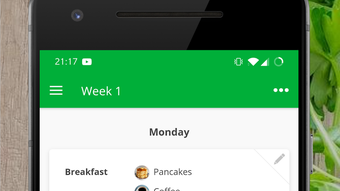
- Weekly Meal Planning Interface – Offers a clear, visual layout to schedule meals across days and weeks, enabling users to preview their eating schedule at a glance.
- Recipe Creation and Sharing – Allows users to build custom recipes and share them with others, supporting collaborative cooking efforts within families or friend groups.
- Copy and Paste Functionality – Enables users to duplicate days or entire weeks, saving time when planning similar meal patterns across multiple weeks.
- Automated Grocery List Generation – Creates a consolidated shopping list based on selected meal plans, improving efficiency and reducing the likelihood of missing ingredients.
- Flexible Planning Across Multiple Weeks – Supports planning for different timeframes, allowing users to prepare meals weeks in advance for better organization.
These features collectively help users reduce planning time, maintain consistency in their eating habits, and support healthier lifestyle choices. For instance, a user preparing for a busy workweek can create a meal plan for Monday through Friday, generate a grocery list, and share it with a partner. The ability to reuse weekly templates is especially beneficial for those following recurring meal patterns or dietary routines.
User Interface, Workflow & Performance
The user interface of MealPlanner is described as simple and well-organized, emphasizing clarity and ease of navigation. Users can access meal schedules, recipe libraries, and grocery lists through a streamlined layout, minimizing the need for complex interactions. The workflow is designed to guide users through the meal planning process in a logical sequence: selecting meals, assigning them to days, generating a grocery list, and sharing the plan.
Performance details were not specified by the developer. However, the software’s lightweight size of 25.6 MB suggests it is optimized for efficient operation on standard mobile devices. The developer did not provide additional system requirements, so resource usage such as CPU or RAM consumption remains unspecified. General software behavior patterns suggest stable operation under typical usage, though real-world performance may vary depending on device capabilities. No reports of crashes or instability were included in the provided information.
Compatibility & System Requirements
MealPlanner is available on Android, with version 1.0.2 currently in circulation. The installation size is 25.6 MB, indicating a compact footprint suitable for devices with limited storage. The developer did not specify exact hardware or OS version requirements, making it unclear whether the app supports older Android versions or requires a specific device configuration. Platform compatibility information is limited to the Android platform, with no indication of support for Windows, Mac, or other desktop operating systems.
Given that the software is described as a desktop application in the title but is currently only available on Android, there may be a discrepancy in platform alignment. Users should verify the intended deployment environment. The lack of detailed system requirements means that compatibility with specific devices or Android versions cannot be confirmed based on the provided data.
Pros and Cons
Pros
- Simple, intuitive interface for easy meal planning
- Supports sharing meal plans and recipes with others
- Time-saving features like copy-paste for days and weeks
- Automated grocery list generation based on meal selections
- Free to download and use
Cons
- Currently only available on Android, limiting desktop access
- No information on system requirements or hardware compatibility
- Limited to mobile platform; no desktop version confirmed
- Performance and stability details not provided by developer
- Version 1.0.2 suggests early-stage development with potential for future updates
FAQ Section
Is MealPlanner available for Windows or Mac?
The software is currently only available on Android. There is no confirmed desktop version for Windows or Mac as of the release date.
Is MealPlanner safe to download and use?
MealPlanner is free to download and developed by One Absolute. While no security vulnerabilities were reported, users should ensure they download the app from official sources to maintain device safety.
Does MealPlanner require an internet connection?
The app’s functionality appears to support offline use for planning and viewing meal schedules. However, features like recipe sharing may require an internet connection.
Can I use MealPlanner without creating an account?
The developer did not specify whether account creation is required. Users may be able to use the app in a limited capacity without registration.
How often is MealPlanner updated?
As of the release date, the app has been updated to version 1.0.2. Future update frequency is not specified by the developer.
Final Thoughts
MealPlanner presents a focused and user-friendly solution for individuals and families aiming to organize their meal routines. With features like automated grocery list generation, recipe sharing, and reusable weekly templates, it effectively reduces the effort required for meal prep and planning. Its free pricing model enhances accessibility, making it a compelling choice for those seeking to improve their eating habits without financial investment.
While the current limitation to Android devices and lack of desktop support may restrict broader adoption, the app’s clean interface and functional design suggest strong potential for future expansion. For users already on Android and seeking a straightforward, no-frills meal planner, MealPlanner offers a practical and efficient tool. The developer’s commitment to usability and organization is evident in the app’s core features.
Download MealPlanner now







